Close Menu
Gsm lover | Make Money Online By Freelancing
  • Home
  • Make Money Online
    • Freelancer
  • WordPress
    • WordPress Tutorials
    • SEO
  • Windows
  • YouTube
  • Health
  • About us
  • Contact us
  • Web Stories
What's Hot

The Secret to Increasing YouTube Views & Subscribers

March 24, 2025

Best Food for Heart Health: Top Choices for a Stronger Heart

February 8, 2025

Best Food for Health in Winter

February 6, 2025
Facebook X (Twitter) Instagram
Gsm lover | Make Money Online By FreelancingGsm lover | Make Money Online By Freelancing
Facebook X (Twitter) Instagram
SUBSCRIBE
  • Home
  • Make Money Online
    • Freelancer
  • WordPress
    • WordPress Tutorials
    • SEO
  • Windows
  • YouTube
  • Health
  • About us
  • Contact us
  • Web Stories
Gsm lover | Make Money Online By Freelancing
Gsm lover | Make Money Online By Freelancing » Wordpress » How to Achieve 100% WordPress loading speed
Wordpress

How to Achieve 100% WordPress loading speed

Silent AngelBy Silent AngelNovember 23, 2022Updated:November 26, 2022No Comments3 Mins Read
Facebook Twitter Pinterest LinkedIn Tumblr WhatsApp Telegram Email
Achieve 100% WordPress loading speed
Share
Facebook Twitter LinkedIn Pinterest Email

How to Achieve 100% WordPress loading speed.
Today we will see how to get the best loading score possible in using generatepress WordPress theme blog.

You can visit our Youtube channel for WordPress web development course.
For more WordPress video tutorial.

Wordpress Loading Speed Wordpress Loading Speed

Wordpress Loading SpeedFirstly you will need a good hosting server.
We will Use generatepress theme.
Once you have configured your wordpress and your generatepress theme settings we can move on to the plugins.
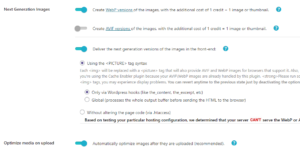
Image Optimization is a must nowadays so go and install Shortpixel image optimization plugin. If you have a lot of images you can go with their premium plan.
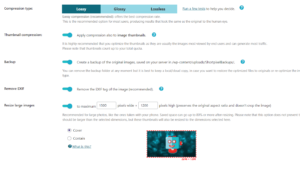
Enable the compresison settings you would like to have. I go with lossy since it maintains a decent quality with the highest compression possible.
Then in the advanced tab, enable the options below. I go with Webp images since I get better results at the moment. But I recommend you to test AVIF version aswell and A/B test which one works best for you.
Wordpress Loading Speed Wordpress Loading Speed

Let´s move on to the caching and magnification plugin, my absolute favorite is WP Rocket (Some alternatives to this are Lite-speed Cache, Super Page Cache for Cloudflare and Autoptimize)

Here are my WP Rocket Settings:

  • Enable caching for mobile devices
  • Minify CSS Files and Optimize CSS Delivery and Load CSS Asynchronously
  • Minify javascript files, load js deferred, delay js execution
  • Lazyload, enable for images, enable for iframes and videos and add missing img dimensions.
  • Activate Link preloading.
    Now that all this is done you want to add Cloudflare to your site. I am not going to cover this since it would make this post too long. It is really easy, just check some guide on google. Once that is done enable wp rocket cloudflare addon and paste there your zone id, PI and email. Then check enable optimal settings option.

I will install the OMGF plugin to host locally and cache our google fonts.
Make sure you have at most 2 font families active and not many weights for each of them
Open the plugin settings and click on start optimization
The check the load early option for the fonts and weights you need.

Wordpress Loading Speed

Now, this last one is not necessary, but I like to have just to have the Lighthouse PWA (Progressive web app) check enabled.
If you are as nerdy as me just download the Super progressive web app plugin and configure it to your liking. Once that is done save it.

Wordpress Loading SpeedWordPress Website using (generatepress Theme) will be lightning fast.
There are some other minor tweaks you can do to increase the speed even more, but with this is enough.

Related

fast loading speed Website Loading Speed WordPress loading speed
Share. Facebook Twitter Pinterest LinkedIn Tumblr Email
Silent Angel
  • Website

Related Posts

How to unlock pro feature of elementor | Auto update elementor pro

September 16, 2022

How to WordPress Speed Optimization | Speed Up WordPress Website

August 20, 2022

How to Fix Leverage Browser Caching Error in WordPress

June 7, 2022

What Does it Cost to Build an eCommerce Website from the Scratch?

June 4, 2022

Learn about what is the WordPress Dashboard

May 28, 2022

How to add 3d layer hover effect on images with elementor

February 11, 2022
Add A Comment
Leave A Reply Cancel Reply

Don't Miss
Wordpress

How to Achieve 100% WordPress loading speed

November 23, 2022

How to Achieve 100% WordPress loading speed. Today we will see how to get the…

How to unlock pro feature of elementor | Auto update elementor pro

September 16, 2022

How to WordPress Speed Optimization | Speed Up WordPress Website

August 20, 2022

How to Fix Leverage Browser Caching Error in WordPress

June 7, 2022
Stay In Touch
  • Facebook
  • Twitter
  • Pinterest
  • Instagram
  • YouTube
Our Picks

The Secret to Increasing YouTube Views & Subscribers

March 24, 2025

Best Food for Heart Health: Top Choices for a Stronger Heart

February 8, 2025

Best Food for Health in Winter

February 6, 2025

How to Keyword Research YouTube Video for Maximum Reach

August 12, 2023

Subscribe to Updates

Get the latest creative news from Gsm Lover about Freelancing, WordPress Web Development, SEO .

    Please Confirm

    Recent Posts
    • The Secret to Increasing YouTube Views & Subscribers
    • Best Food for Heart Health: Top Choices for a Stronger Heart
    • Best Food for Health in Winter
    Gsm lover | Make Money Online By Freelancing
    Facebook X (Twitter) Instagram Pinterest
    • Home
    • Windows
    • Freelancer
    • WordPress
    • SEO
    • Contact us
    • About us
    © 2026 GsmLover. Designed by Pro WP Web.

    Type above and press Enter to search. Press Esc to cancel.