









How to stop Drivers updates On Windows using Registry.
Open the Run command, You can run Using the Keyboard Windows key + R.
Type regedit, and click OK to open the Registry.
Browse the following path: HKEY_LOCAL_MACHINE\SOFTWARE\Policies\Microsoft\Windows
Right-click the Windows (folder) key, select New, and click on Key.
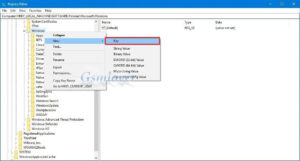

Name the key WindowsUpdate and press the Enter Button.
Right-click the newly created key, select New, and click on DWORD (32-bit) Value.
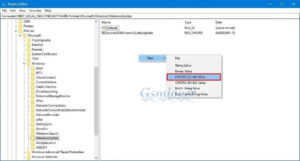

Name the key ExcludeWUDriversInQualityUpdate and press Enter Button.
Double-click the newly created DWORD and set the value from 0 to 1.
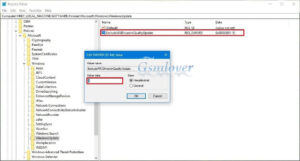
Click OK.
Once you have completed the all steps, cumulative updates will continue to download, but you won’t receive updates for drivers on your computer Windows.


