
Close Menu
Gsm lover | Make Money Online By Freelancing
  • Home
  • Make Money Online
    • Freelancer
  • WordPress
    • WordPress Tutorials
    • SEO
  • Windows
  • YouTube
  • Health
  • About us
  • Contact us
  • Web Stories
What's Hot

The Secret to Increasing YouTube Views & Subscribers

March 24, 2025

Best Food for Heart Health: Top Choices for a Stronger Heart

February 8, 2025

Best Food for Health in Winter

February 6, 2025
Facebook X (Twitter) Instagram
Gsm lover | Make Money Online By FreelancingGsm lover | Make Money Online By Freelancing
Facebook X (Twitter) Instagram
SUBSCRIBE
  • Home
  • Make Money Online
    • Freelancer
  • WordPress
    • WordPress Tutorials
    • SEO
  • Windows
  • YouTube
  • Health
  • About us
  • Contact us
  • Web Stories
Gsm lover | Make Money Online By Freelancing
Gsm lover | Make Money Online By Freelancing » Featured » How to Check Website is Well SEO Optimized
Featured

How to Check Website is Well SEO Optimized

Silent AngelBy Silent AngelJune 10, 2021Updated:May 30, 2022No Comments2 Mins Read
Facebook Twitter Pinterest LinkedIn Tumblr WhatsApp Telegram Email
How to Check Website is Well SEO Optimized gsmlover
Share
Facebook Twitter LinkedIn Pinterest Email

How to Check Website is Well SEO Optimized

SEO is very important for website to take place on search engines. Search engines are big source of website traffic. We need to check if our website SEO is correct and well optimized. For this we will use a WordPress plugin called All in One SEO (AIOSEO).
AIOSEO also available in free version .

Seo Optimization and SEO Optimized

Now need to install AIOSEO and activate it. you can check how to install wordpress plugin step by step.

Aftter activation, you’ll see a new menu item with name ‘All in One SEO’. You need to go toAll in One SEO –> Dashboard, and it will take you to the main settings panel. Now click  on the button to ‘Launch the Setup Wizard’.

AIOSEO dashboard


This ٰٓAIOSEO plugin wizard lets you configure your website.

After complete the plugin wizerd, navigate to All in One SEO » SEO Analysis.

In the SEO Audit Checklist tab will show error of your website overall SEO score.
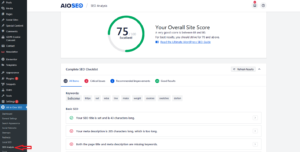
AIOSEO Analysis

Here you’ll see the ‘Complete SEO Checklist’. You can correct error by check your checklist for properly optimizing your WordPress website.

AIOSEO Complete seo Checklist

First you will need to fix the critical issues because these error very impact on your seo score.
To see the what is issue you will need to click on the Arrow right side of an SEO issue, After click on Arrow, now box will dropdown that explains the problem that you can do to fix it.

AIOSEO Critical Issues Edit

Now you can clicking the blue Edit Your meta description button to change needs to be made.
After make the changes, you will need to go back to the SEO Analysis page and click the Refresh Results button.
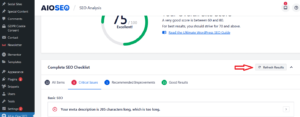
AIOSEO Analysis refresh result

After Refresh results button this will update your results and reflect the positive SEO improvements you have made.
You can see here the red Critical Issue has now changed into a green Checkbox in the Good Result tab.

AIOSEO Analysis refresh result correct

You can take same steps for solve the critical issues found by the AIOSEO plugin and make changes to improve your website seo score.


Related

aioseo all in one seo SEO seo optimization SEO Optimized
Share. Facebook Twitter Pinterest LinkedIn Tumblr Email
Silent Angel
  • Website

Related Posts

What is the benefit of SEO

December 8, 2022

How to Achieve 100% WordPress loading speed

November 23, 2022

How to unlock pro feature of elementor | Auto update elementor pro

September 16, 2022

How to WordPress Speed Optimization | Speed Up WordPress Website

August 20, 2022

What Is SEO / Search Engine Optimization?

July 17, 2022

How to Fix Leverage Browser Caching Error in WordPress

June 7, 2022
Add A Comment
Leave A Reply Cancel Reply

Don't Miss
Wordpress

How to Achieve 100% WordPress loading speed

November 23, 2022

How to Achieve 100% WordPress loading speed. Today we will see how to get the…

How to unlock pro feature of elementor | Auto update elementor pro

September 16, 2022

How to WordPress Speed Optimization | Speed Up WordPress Website

August 20, 2022

How to Fix Leverage Browser Caching Error in WordPress

June 7, 2022
Stay In Touch
  • Facebook
  • Twitter
  • Pinterest
  • Instagram
  • YouTube
Our Picks

The Secret to Increasing YouTube Views & Subscribers

March 24, 2025

Best Food for Heart Health: Top Choices for a Stronger Heart

February 8, 2025

Best Food for Health in Winter

February 6, 2025

How to Keyword Research YouTube Video for Maximum Reach

August 12, 2023

Subscribe to Updates

Get the latest creative news from Gsm Lover about Freelancing, WordPress Web Development, SEO .

    Please Confirm

    Recent Posts
    • The Secret to Increasing YouTube Views & Subscribers
    • Best Food for Heart Health: Top Choices for a Stronger Heart
    • Best Food for Health in Winter
    Gsm lover | Make Money Online By Freelancing
    Facebook X (Twitter) Instagram Pinterest
    • Home
    • Windows
    • Freelancer
    • WordPress
    • SEO
    • Contact us
    • About us
    © 2026 GsmLover. Designed by Pro WP Web.

    Type above and press Enter to search. Press Esc to cancel.